MySQL indexes: the trade-off nobody tells you about
Have you ever had a query that took 30 seconds and, after you created an index, started running in 50ms? That feeling is too good. But what about when you notice that your bulk insert system, which used to be fast, started choking after you added “just one more index”?
That is the trade-off almost nobody talks about. This article explains how indexes work on the inside, what you gain, what you pay, and presents a benchmark I ran to measure that cost in practice.
So what is an index, anyway?
Picture a book without a sorted index. To find every page that mentions “B-Tree”, you would have to read the entire book, cover to cover. That is what the database does when you have no index, a full table scan, reading row by row until it finds what it is looking for.
An index is a separate data structure, maintained by the database alongside the table, that lets you locate records without sweeping the whole table. InnoDB (MySQL’s default engine) uses a structure called a B-Tree (Balanced Tree).
B-Tree: the structure behind everything
A B-Tree organizes data in ordered, hierarchical nodes. The search starts at the root, goes down through the intermediate nodes comparing values, until it reaches the leaves, where the pointers to the actual data live. Instead of reading all N rows, you traverse only log(N) nodes. For a table with 1 million rows, the difference between scanning everything and navigating the tree can be hundreds of milliseconds versus microseconds.
         [50]
        /    \
    [25]      [75]
   /    \    /    \
 [10] [30] [60] [90]
The B-Tree keeps values always sorted. That is fundamental to understanding both the gains and the costs.
What you gain with indexes
Much faster lookups
The most obvious use case. With an index on email, a query like WHERE email = ‘franco@mail.com’ no longer needs to read every row in the table. The database navigates the B-Tree and lands right on it.
The same goes for sorting (ORDER BY) and joins (JOIN). If the columns involved are indexed, the database does not need to sort everything in memory.
Composite indexes: order matters
An index on (col_a, col_b) benefits queries that filter by col_a alone, or by col_a and col_b together, but does not benefit a query that filters only by col_b. That is because the tree is sorted first by col_a, then by col_b within each value of col_a.
This is the so-called “leftmost prefix” rule. The composite index works if you use the columns from left to right.
What you pay with indexes
Here is the part that usually gets ignored.
Every INSERT has an extra cost
When you insert a row into the table, the database does more than write the data. It needs to update every existing index, find the correct position in the B-Tree, insert the new value and, if necessary, rebalance the tree to keep it balanced. That process is called a page split when a node fills up.
If you have 9 indexes on a table, each INSERT does, in practice, 10 writes (one to the table + nine to the index structures). The cost grows linearly with the number of indexes.
Disk space
Every index is stored on disk. In tables with many indexed columns or with heavy data (like UUIDs in CHAR(36)), the space taken by indexes can easily exceed the space taken by the data itself.
UUID vs INT: why the data type matters so much
UUID is a great choice for many systems. It guarantees global uniqueness without central coordination, makes merges between distributed databases easier, and avoids exposing predictable sequential IDs in public APIs. For modern applications, especially distributed ones, it makes a lot of sense.
The point is, using UUID well requires awareness of the cost. UUIDs are generated randomly, so when you use them as an indexed value, every insert needs to find a random position in the B-Tree, which causes far more page splits than an INT AUTO_INCREMENT, which always goes to the end of the tree (it is sequential by nature).
If you want the best of both worlds, there is UUID v7 (ordered by timestamp) and strategies like MySQL’s UUID_TO_BIN(uuid, 1), which reorders the bytes to reduce this problem.
The benchmark, measuring the cost in practice
To visualize this trade-off, I built a benchmark that tests different indexing scenarios with concurrent inserts in MySQL. The code is available on GitHub: francocontigo/index-insert-mysql-benchmark.
Methodology
The script (benchmark_indexes.py) tests 4 index scenarios:
- baseline: no secondary index at all
- few: 2 simple indexes (col_a, col_b)
- medium: 4 simple indexes + 1 composite
- many: 6 simple indexes + 3 composite (9 indexes in total)
For each scenario, the benchmark runs with two data types in the columns, INT and UUID (CHAR(36)), and two volumes: 50,000 and 200,000 rows, using 4 parallel insert threads. Each scenario is executed 5 times and the average is computed.
# Example of the "many" scenario: 9 secondary indexes
"many": [
    "CREATE INDEX idx_a ON test_indexes(col_a)",
    "CREATE INDEX idx_b ON test_indexes(col_b)",
    "CREATE INDEX idx_c ON test_indexes(col_c)",
    "CREATE INDEX idx_d ON test_indexes(col_d)",
    "CREATE INDEX idx_e ON test_indexes(col_e)",
    "CREATE INDEX idx_f ON test_indexes(col_f)",
    "CREATE INDEX idx_ab ON test_indexes(col_a, col_b)",
    "CREATE INDEX idx_cd ON test_indexes(col_c, col_d)",
    "CREATE INDEX idx_ef ON test_indexes(col_e, col_f)"
]
What the benchmark reveals
The charts below were generated directly from the analysis notebook (analysis_indexes.ipynb) after the runs.
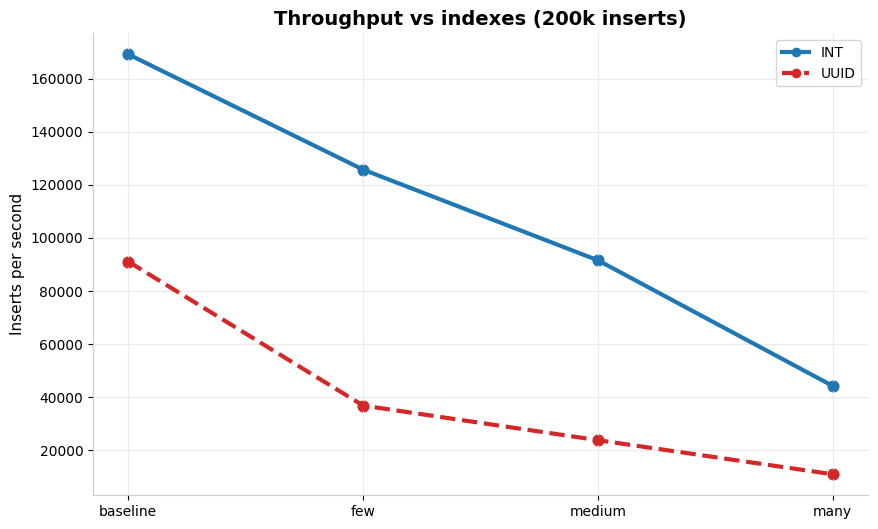
Throughput vs indexes (200k inserts), blue line INT, red dotted line UUID:
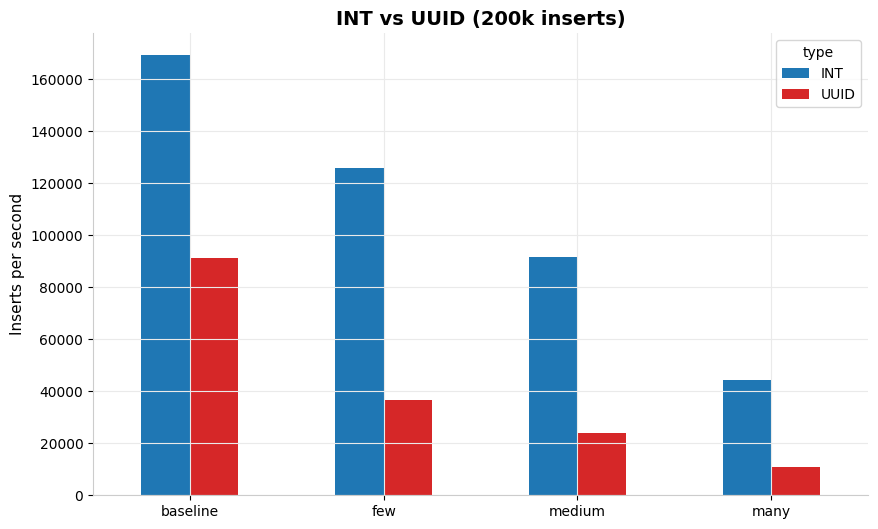
INT vs UUID (200k inserts), side by side:
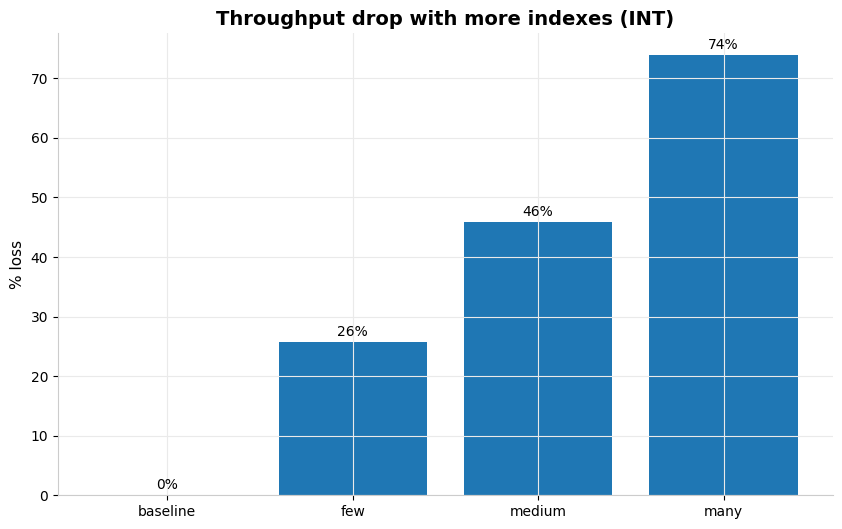
Throughput drop with more indexes (INT):
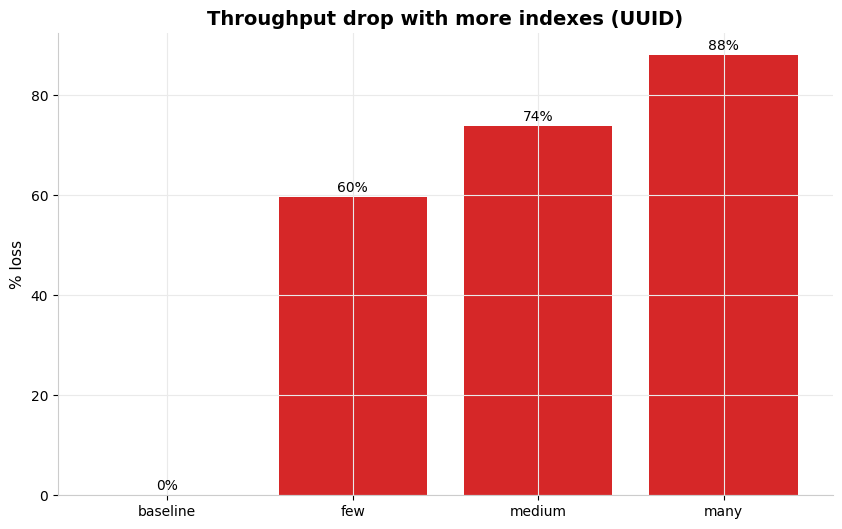
Throughput drop with more indexes (UUID):
With INT, the degradation is progressive but controlled:
- few (2 indexes): -26% throughput vs baseline
- medium (5 indexes): -46%
- many (9 indexes): -74%
The baseline starts at ~167,000 inserts/s and lands at ~45,000 in the many scenario. A real drop, but one that still keeps reasonable throughput.
With UUID, the picture is far more severe:
- few: -60%
- medium: -74%
- many: -88%
The UUID baseline already starts lower (~91,000 inserts/s) and plunges to ~11,000 in the many scenario. A drop of almost 90% from the starting point.
The concrete lesson goes beyond “don’t use UUID”. The lesson is that using UUID well means planning the indexing strategy together with it. UUID v7 (ordered by timestamp) or UUID_TO_BIN(uuid, 1) in MySQL drastically reduce the B-Tree fragmentation problem. The way forward keeps the UUID and applies it with awareness.
When to create (and when not to create) an index
Create an index when:
- The column shows up frequently in WHERE, JOIN ON or ORDER BY
- The column has high cardinality (many distinct values), indexing a boolean column is rarely worth it
- The table is read far more than it is written (OLAP systems, reports, read-only queries)
Avoid or rethink an index when:
- The table receives inserts/updates at high frequency and volume
- You are indexing low-cardinality columns
- You are adding indexes “just in case” without knowing which queries will use them
- The data is UUID and the table is write-heavy
EXPLAIN
Before creating an index, use EXPLAIN to understand what the database is doing:
EXPLAIN SELECT * FROM pedidos WHERE cliente_id = 42;Look at the type column. If it says ALL, you have a full table scan. If it says ref or range, an index is being used. The key column shows which index was chosen.
But what if we already have lots of indexes created? What is the command to see which ones were never used?
SELECT
    object_schema,
    object_name,
    index_name,
    count_star
FROM performance_schema.table_io_waits_summary_by_index_usage
WHERE index_name IS NOT NULL
ORDER BY count_star ASC;- count_star = 0 means the index was never used since the server started
- low values indicate an index almost never used
- index_name = NULL means access without an index (full scan)
- This only counts since the last MySQL restart
- If performance_schema is not enabled, it does not work
- There may be an “unused” index that is still critical (e.g. run once a week in a batch job)
Conclusion
Indexes are not free. They trade read performance for write cost and disk space. The sweet spot depends on your usage pattern.
The practical recommendation is always the same, measure before deciding. Use EXPLAIN, analyze your system’s query pattern, and test the impacts.
The code is open and available for you to run in your own environment: github.com/francocontigo/index-insert-mysql-benchmark